
Blog ·
Is There a Public Xbox Series X Emulator Download? No.
Identify the original console generation and check exactly what a publicly downloadable build can demonstrate.
The public projects reviewed here do not provide a general Xbox Series X|S emulator for Windows. A Series X|S console can be mentioned in an emulator listing as the machine running the emulator, even when the emulator’s games come from a much older console. Public Xbox Series research offers technical demonstrations and a GPU diagnostic rather than a verified way to play GTA VI.
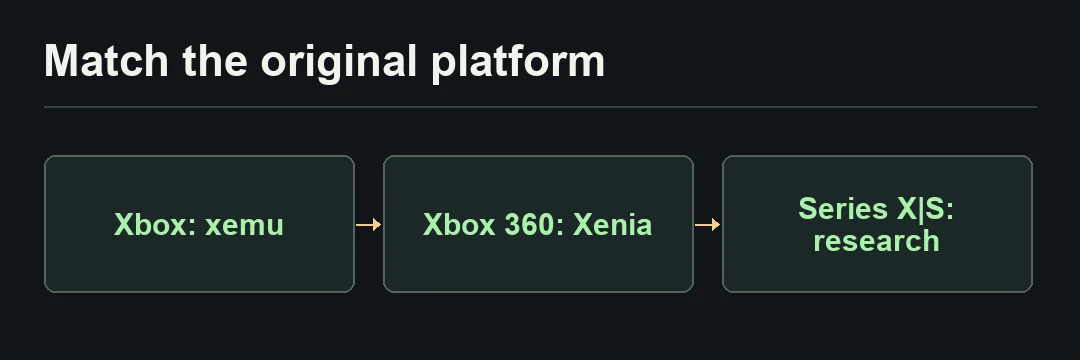
Start with the console named on the original release
When searching for a game, the words on the current hardware and on the game’s original platform can collide. A listing describing an emulator that runs on a Series console uses Series as the host. The emulated machine is called the guest. An Xbox 360 emulator on a Series S uses the newer machine to execute older Xbox 360 software. Putting the Series name in the page title does not change the type of guest program the emulator accepts. Xenia’s own download page explicitly distinguishes a UWP build that runs on Series hardware from endorsed Xenia releases.
A similar problem arises when the same franchise has entries on several generations. You can find an original Xbox disc, an Xbox 360 edition, a Windows release and a modern remaster using similar names and artwork. Each can require different file formats and render paths. Start with the publisher’s platform and edition information, then consult a project catalog for that exact title. The console guides explain the useful paths starting from the guest generation.
A Series game normally belongs to a different software and runtime environment from the Xbox 360 title Xenia targets. CPUs use different instructions across those generations. Device features, drivers, game services, graphics operations and asset formats differ as well. A project supporting an older generation may still be a good choice for a particular older title. That project’s history does not predict support for a new standalone Series title.
How compatibility research gets confused with emulation
Researchers can investigate Series graphics on Windows without modeling an entire console. Xbox2Windows translates selected CPU and shader inputs in advance and tests the results in Windows fixtures. XCL tries to run x64 code directly and provide replacement system interfaces. Leonida translates shader programs to SPIR-V and builds surrounding Vulkan support. The projects can show component results while the game-level call chain remains incomplete.
A standalone diagnostic is especially easy to mislabel. The GPU Check archive has a tag, a downloadable file and a checksum. It runs selected workloads and reports adapter capabilities. The fact that it is an executable research test gives no basis for calling it a console emulator. It cannot infer support for games from a successfully tested shader. Review the exact asset name, the output described by the maintainer and the tests published with that release.
Reading a project roadmap also requires care. A project’s name may mention playing games on Windows because that is the research goal. Its work may include pieces of loading, shader translation, utilities, validation or system APIs. The current status often appears lower in the README and is more specific than the project description. Check the latest release separately, since code in the main branch can be ahead of the downloadable tag. Missing or partial assets should not be filled in using a file from a stranger.
A short test for a download claim
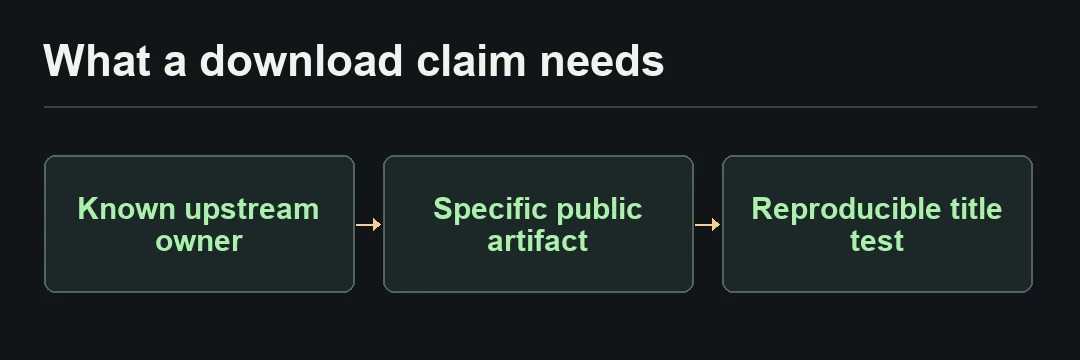
First, identify the publisher. Open the repository through a known project link and check the account, version history and release page. A familiar name on a package, thumbnail or cloned README gives very little identity information. The official repository can also link to the project’s own releases or use project-specific package names.
Next, read the artifact description and determine what it does. See whether the maintainer labels it a test, diagnostic, proof of concept or supported application. A software release can establish that some code is publicly available without shipping the game or executing a commercial title. Verify the file digest from the exact tag if you are considering running the package.
Finally, check the evidence for the title. Look for a recorded revision, supported environment and clear description of where the program reached. A startup logo demonstrates some initialization. It leaves input, audio, saving or later gameplay open. A stable supported emulator normally documents repeatable steps and keeps track of compatibility reports. It should also be possible to compare independent reports using the same build. A clip or screenshot with no source metadata has no similar trail for diagnosis.
How to handle a convincing-looking listing
A misleading listing may link a real project while distributing a different file. When that happens, follow the repository and download the applicable release link directly from it. A checksum shown on the same dubious page only compares to the source that supplied the suspicious file. If a known project offers no equivalent package, there is no file to verify against that project’s release.
An official package can also be withdrawn or replaced. Compare the exact filename, size and SHA-256 in the release metadata. If the old link no longer works, check the newer tag and its accompanying notes. Avoid searching for download mirrors with the same filename. Our version catalog retains historical tags when a trusted upstream asset disappears and marks the withdrawn file unavailable.
For GTA VI, check the current public platforms before assuming a Windows video demonstrates local rendering. An owned console using Remote Play and a local native PC build can both display an image on Windows, but their execution happens in different places. Announcements about cloud support on Xbox One should be read as the list of compatible client devices. They provide no new Xbox One build of the game.
Screenshots can help identify the title screen and hardware configuration when they come with a marked revision and test description. A screenshot without the original platform label leaves even the identity of the game build open. Prefer evidence a second tester can repeat, especially when the download claims support for every game.
What is useful today
For supported Xbox 360 and original Xbox titles, there are mature projects with official access paths and recorded compatibility. For Series software, the practical options depend on the official game’s platforms and supported streaming devices. Research followed through the status board can still be valuable to developers and testers, especially when upstream publishes a focused fixture and enough information to reproduce it.
The most useful future evidence would be a source-identified public build, a documented executable to test legally and maintained compatibility records tied to revisions. Until then, evaluate the current projects on the specific experiments they publish. You can follow the safety guide for file provenance checks and the version guide for exact SHA-256 commands.
Common questions
Does a Series console running Xenia make Xenia a Series emulator?
No. The Series system in this example is the host. Xbox 360 remains the emulated guest. Check the original release platform when a tool's listing names both.
Does the project name identify the safest download?
The verified owner and exact release identify it. Look for upstream release notes and compare the published checksum for the specific file before running it.
What can I test with a confirmed Series research artifact?
Start with the test the maintainer describes. An adapter diagnostic can test graphics capabilities or specific fixture output. A passing result gives you evidence about those inputs and that hardware, which you can record independently of title support.